
From Training to Deployment: Push Your Unsloth Models to Jozu with KitOps
Dec'25 - Issue #70

Welcome to the AI Insights tribe. Join others who are receiving high-signal stories from the AI world. In case you missed it, Subscribe to our newsletter.
In this writeup, we will see how you can fine-tune the latest IBM Granite-4.0 model using Unsloth and push it seamlessly to Jozu ML via HuggingFace. Jozu ML is missing production ops layer for AI - secure packaging, policy control, security scanning, and deployment integrity. After pushing, you can easily pull the model anywhere and run inference without any extra setup.
What are Unsloth, KitOps, and Jozu and how are they improving LLM projects?
Unsloth simplifies the fine-tuning and optimization process for open source LLMs, enabling faster training and reduced memory usage. KitOps acts as a “Git for machine learning,” allowing developers to version, package, and share not only code but also models, datasets, and configurations in a reproducible and portable format. Jozu ML, on the other hand, serves as an OCI-compliant registry built for machine learning which is designed to host, version, and deploy models, weights, and pipelines, making collaboration between teams effortless and scalable.
Together, Unsloth, KitOps, and Jozu create an ecosystem that bridges model development, packaging, and deployment into one continuous workflow.
Problem statement
We are using the Support Bot Recommendation dataset from HuggingFace. Our goal is to fine-tune a language model on this dataset so it can understand and respond to technical, developer-focused queries.
By fine-tuning the model on this niche technical data, we can turn it into a chatbot that helps developers whenever they get stuck, offering relevant suggestions, explanations, and troubleshooting steps.
Let’s start building it.
We will follow a complete workflow:
Fine-tuning with Unsloth
Saving the model to Jozu ML via HuggingFace
Using KitOps to pull a model.
Use a pulled model for an inference.
Other deployment options from Jozu ML
1. Fine-Tuning IBM Granite 4.0 with Unsloth
We will use the official Unsloth notebook for IBM Granite 4.0:
Granite 4.0 Fine-tuning Notebook.
The latest IBM Granite 4.0 has different models supporting Unsloth, refer to this official document by Unsloth: https://docs.unsloth.ai/models/ibm-granite-4.0.
Also, this is the Google Colab notebook we are following throughout this article for fine-tuning IBM Granite 4.0 using Unsloth.
These are available model associated with Unsloth-IBM Granite 4.0
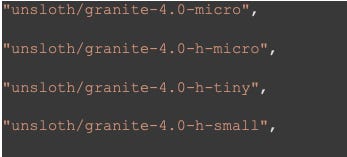
Let’s see some important code blocks from the Colab notebook, to understand the model and data format.
For this project, we are using the granite-4.0-h-micro model and loading tokenizer as well.
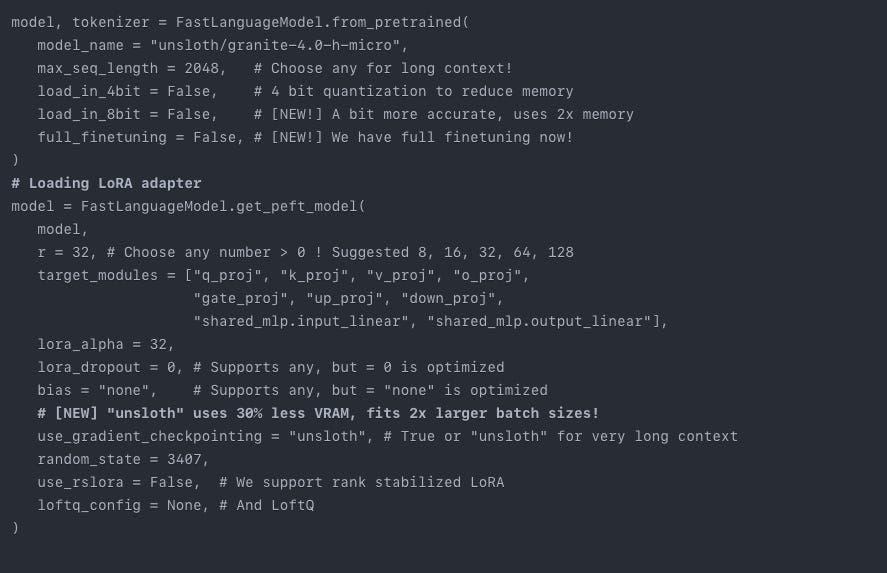
For the data, we have a tabular training data from HuggingFace
We are creating a customer support bot that performs QnA tasks to help and solve issues. It has two fields: See the data
Snippet: A short customer support interaction
Recommendation: A suggestion for how the agent should respond.
On this data, we will fine-tune our Granite-4.0 model using Unsloth
For more details refer to the code from Google Colab.
What makes Unsloth special is training LLMs on 16GB T4 GPU or similar small GPUs, even on big GPUs it helps the team to save the cost and maintain the same accuracy as larger models.
Here’s a memory stats before and after training:
Before training
GPU = Tesla T4. Max memory = 14.741 GB.
6.059 GB of memory reserved.
After training:
954.0727 seconds used for training.
15.9 minutes used for training.
Peak reserved memory = 10.42 GB.
Peak reserved memory for training = 4.361 GB.
Peak reserved memory % of max memory = 70.687 %.
Peak reserved memory for training % of max memory = 29.584 %.
Post-training stats show efficient GPU utilization. The model used only about 70% of total memory and 30% specifically for training, which indicates that Unsloth optimized the fine-tuning process well without exhausting GPU capacity. In short, its better memory usage was balanced and training completed in under 16 minutes on a Tesla T4, showing strong efficiency.
2. Saving the model to Jozu ML via HuggingFace
After training, we can save the model in 16-bit merged format directly to a HuggingFace directory. There is no need to download or configure it locally. Jozu ML now supports HuggingFace model registries, so you can simply submit your model repository and pull your fine-tuned HuggingFace model into Jozu ML with a single click. Let’s do it.
In the last two cells of the Google Colab notebook, you can uncomment the code blocks to save the model. We will save one of the 16-bit models directly to HuggingFace without storing it on Google Drive or your local machine. You can also install the .GGUF version of the model. At the bottom of the notebook, you will find the cell for installing Llama.cpp and converting your fine-tuned model into .GGUF format. For now, I am keeping it simple by using the default 16-bit merged model. You can also save the LoRA adapters. Refer to the Colab notebook for details.
Pushing fine-tuned Unsloth IBM Granite 4.0 model to HuggingFace Hub.

Simply replace “hf/model” with your “huggingface-username/model-registry-name.” Even if you haven’t created a repository, HuggingFace will generate one automatically. If the repository already exists, it will push the latest model to it. Make sure to paste your HuggingFace token in the token parameter, as it is required for authorization.
3. Pulling a fine-tuned model to Jozu ML
Now let’s pull the model into Jozu ML. Without any installation, you can easily load your HuggingFace model into Jozu ML in just a few clicks.
What is Jozu ML and what does it do?
Jozu is an OCI compliant MLOps platform for storing, versioning, and deploying machine learning models, datasets, and pipelines. It follows Open Container Initiative standards, making it compatible with tools like Kubernetes, Docker, and vLLM. Jozu ML provides a simple and reproducible way to manage and share ML assets across teams and environments. It can sits on your infra - onprem and help you ship ML apps faster in production with better control and nullify your failure rates during changes in ML apps.
Create a model on Jozu.ml and after that click on top-right corner as shown below:

Click on Import from HuggingFace you actually import your fine-tuned Unsloth model from HuggingFace:
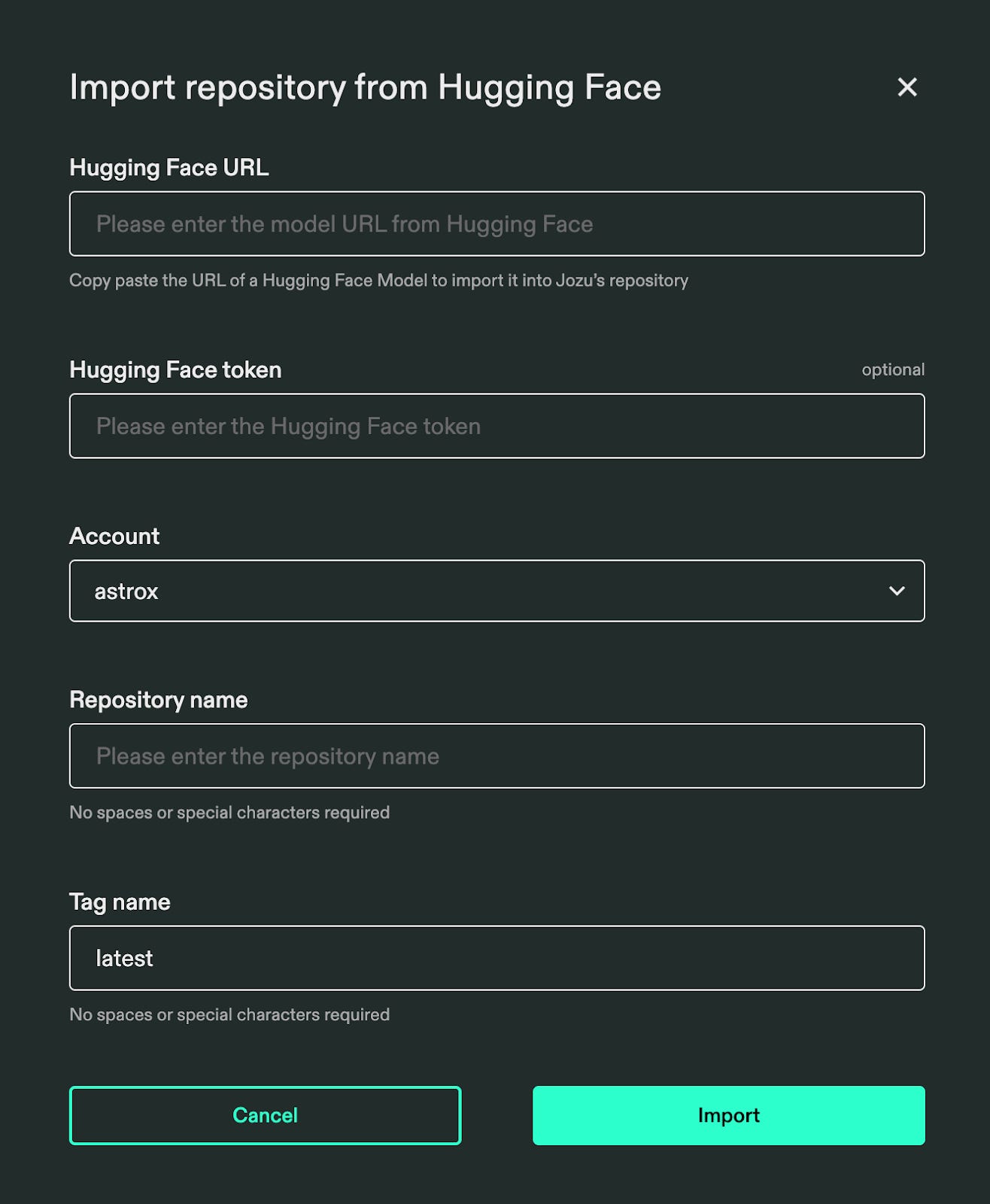
Paste your HuggingFace URL, select your account, and import your fine-tuned Unsloth model into Jozu ML. The installation may take a few minutes, and Jozu ML will notify you by email once the pull operation is complete.
After the model is pulled, go to “My Repositories” from the navigation bar, where you can see the imported model.
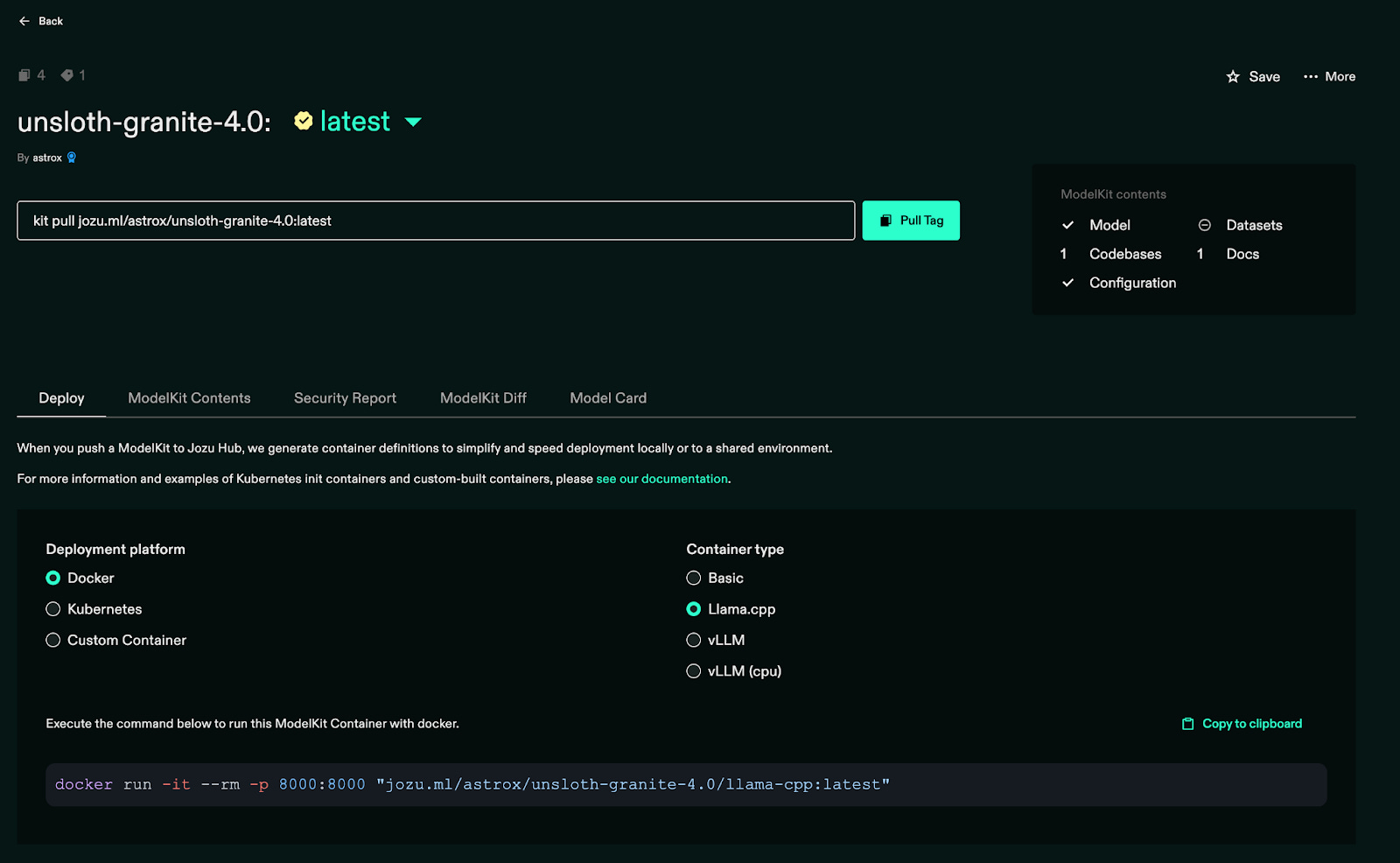
Using Jozu and KitOps, we can version and version control the model, data, and even code in a single OCI registry managed by Jozu. Managing these artifacts usually requires different tools and setup. KitOps and Jozu reduce this effort for ML Engineers. In the next section, we will see how to deploy this model into a production environment.
4. Using KitOps to pull a model
To download KitOps in your local environment, follow this guide: KitOps CLI installation
Check your KitOps version:
> kit version
Version: 1.8.0
Commit: 9716645622552183986438fddb3144bbfcc4ba4c
Built: 2025-09-17T18:15:33Z
Go version: go1.24.0
KitOps is installed successfully, now let’s pull your model into local environment in few commands:
Create a new directory:
> mkdir unsloth-granite-4.0
Log into Jozu.ml
> kit login jozu.ml
(enter your mail id and password)
Pull the model from Jozu ML:
> kit pull jozu.ml/astrox/unsloth-granite-4.0:latest
(replace this model URL with your repository)
Verify the pull:
> kit list
You can see that, a model is installed locally.
After verification, let’s unpack the model into the created directory.
First, go inside your directory:
> cd unsloth-granite-4.0
And, unpack model here,
> kit unpack -d . jozu.ml/astrox/unsloth-granite-4.0:latest
Now your model and artifacts are installed into your local directory. You can see this.
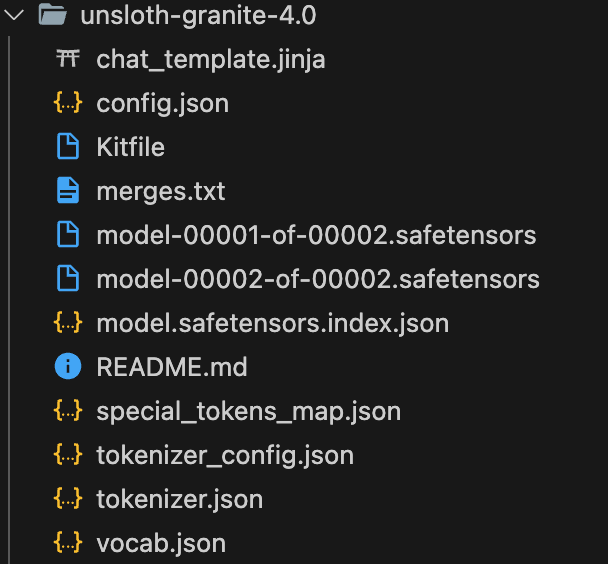
You can put the Kitfile inside a directory which is created by KitOps to configure the versioning of the model. It’s an important file to perform any kitops operation. File is in the .yml format:
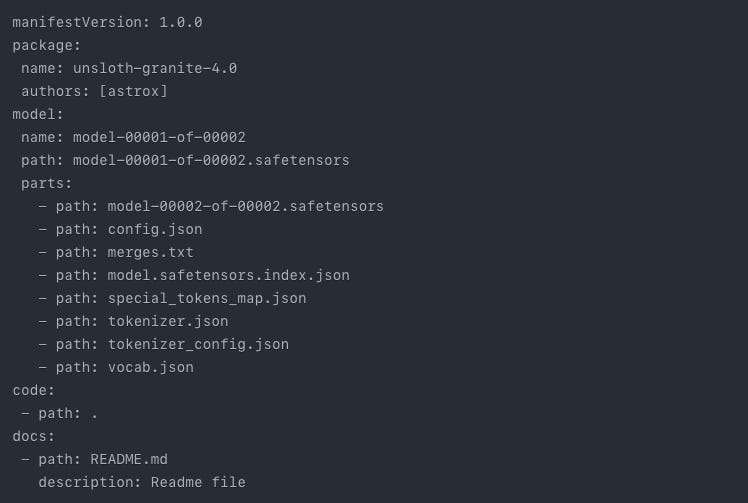
You can edit this file as per your need.
Note: In this article we performed pull operation, as our training environment is Google Colab notebook from Unsloth. But you push your own model, data, artifacts, and even code to Jozu ML by performing push operations. See this doc for push operation and more.
5. Use a pulled model for an inference
We’ve successfully pulled the Unsloth IBM Granite 4.0 model from Jozu ML. Now let’s quickly set up the inference environment.
Install the required libraries:
pip3 install --upgrade transformers torch accelerate sentencepiece
After installation, let’s simply write an inference script for the model. check this Gist
In this script, we set up the basic code to run inference using Transformers. A test query is also included. When you run the script, you will get an output like this:

This is how you can use Jozu ML to set up your inference easily with the KitOps CLI and minimal setup.
Let’s look at the other options as well.
6. Other deployment options from Jozu
Jozu supports different deployment options. If you want to move your packaged modelkit straight to production. Let’s see what operations you can do.
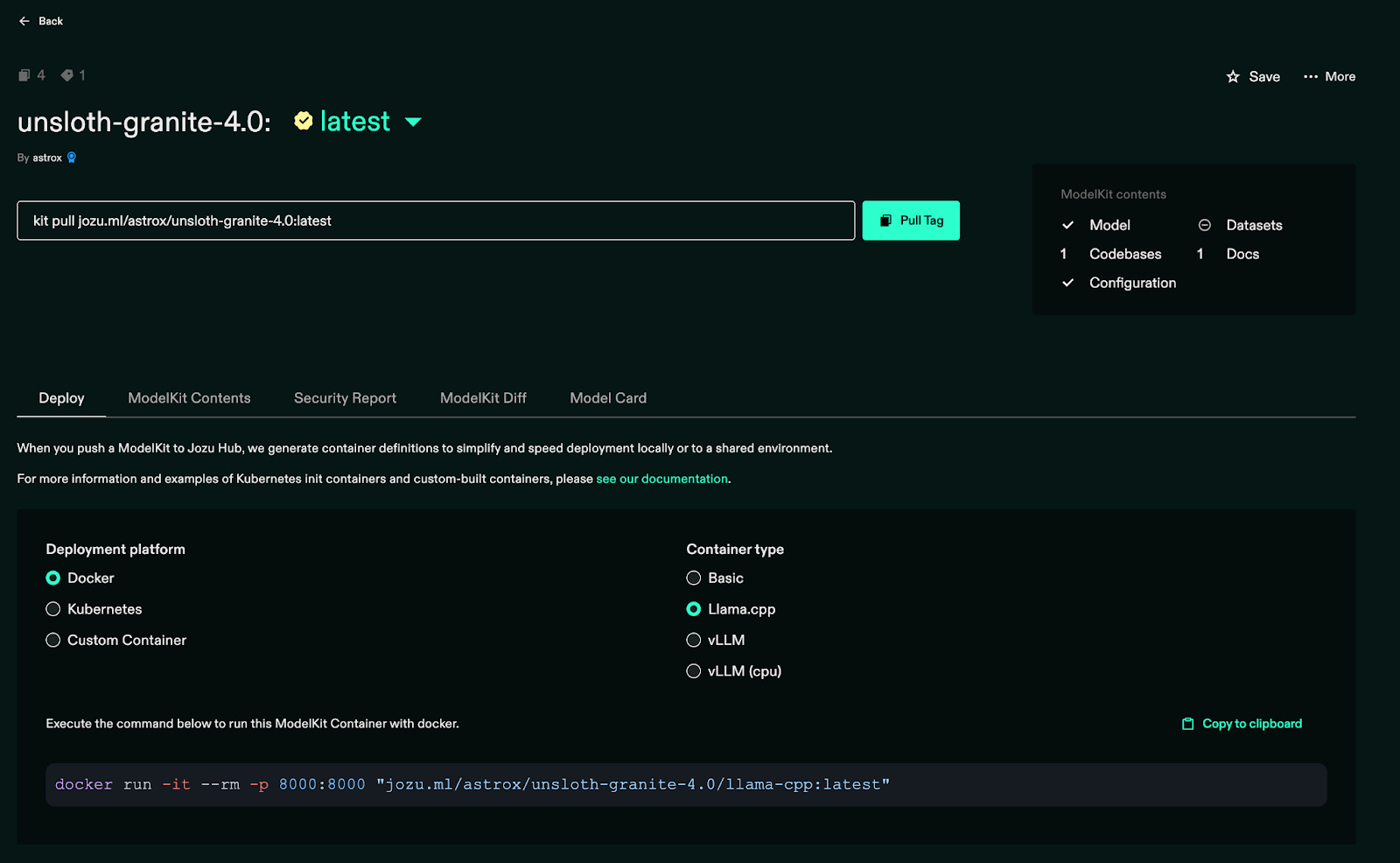
Jozu ML supports deployment on Docker, Kubernetes, and even custom clusters. You can run your FP16 model using Llama.cpp or vLLM simply by selecting the appropriate command, without any manual code-level conversion. Jozu ML provides this flexibility and makes the MLOps pipeline easier, especially when it comes to serving the model for inference.
Wrap-Up
Once your model is fine-tuned, KitOps and Unsloth make it easy to version your code, data, and model. Jozu ML takes care of the rest by allowing you to deploy and convert the model into production without manual setup. With support for Docker, Kubernetes, vLLM, and Llama.cpp, it provides a flexible and smooth path to serving quantized or FP16 models. Jozu ML also pulls your HuggingFace model directly into its own repository, making the overall production workflow simpler and reducing infrastructure complexity.
As we’ve seen, KitOps and Jozu ML provide a seamless, simplified path from fine-tuning to production model serving. They automatically manage versioning, deployment, and infrastructure complexity in a single workflow.
Reference:
Sukriya🙏🏼 See You Again Next Week! Till Then Keep Learning and Sharing Knowledge with Your Network
Brilliant walkthroguh of the full workflow! The integration betwen Unsloth, KitOps, and Jozu really showcases how much friction we can remove from model dev to deployment. What stands out is how Jozu handles OCI compliance while pulling directly from HuggingFace, it essentially solves the versioning and artifact managment chaos most teams face without adding extra tooling overhead.